
SOP for : Inbound requests for Demand:
- Want to become a dealer
- Want to become a Distributor
- Need a quote ( upon checking M3/Power BI - Requester is not listed as a TLC Account)
- Non- Profit Request - Requesting to purchase product / product in bulk.
Adam's Update: 10/15/2025:
Update: Increased from minimal of $50K to $100K to be approved
1. Any new customer lead that is below $100K in annual sales will be sent to our DTC sites for ordering vs setting an account up
2. If the request is a one time order , and is over $10K , we will offer a 15% discount code to be applied at check out on our DTC sites.
3. Once new customer provides all required information:
-If customer confirms they will have annual orders $100K or above
-Reach out to Adam Hendren providing ticket number & customer details requesting approval to escalate to Brian Sheehy
-Adam will advise how to proceed.
Note: Brian's Sheehy's email address is: bsheehy@thelegacycompanies.com
Adam's Update: 10/20/2025:
1. Adam advised TLC will not approve New Customer Account set up , selling on Amazon
2. I have added the below in the Canned Response titled: Sales Admin: Become a Dealer (Collecting Customer information)
A)- In the body of the canned response I slightly modified line number 6. From saying -> Product Brand/Product description to now reflect the following:
* List the Product Brand/Brands
B)- Added line 7 List the Product/Products descriptions (Model Number/numbers)
Important Questions we need to ask is:
- How frequently will you place an order?
- What do you anticipate your average order size will be?
(I have included both questions in initial canned response, collecting customer information)
Adam's Update: 1/14/2026:
-For all new customer wanting to set up an account and be provided a quote not meeting the $100K annual criteria
-Will all be given a 15% discount code when advised to place order on our TLC Website.
| TLC Websites & Discount Codes : Offer for one time orders that are over $10K |
| Brand | 15% Off Discount Code | Link to the Website Brand |
| Chef's Choice | 154RETAIL-CC | https://chefschoice.com/ |
| Excalibur | 154RETAIL-EX | https://excaliburdehydrator.com/ |
| Kalorik | 154RETAIL-KL | https://www.kalorik.com/kalorik.com |
| Omega | 154RETAIL-OM | https://omegajuicers.com/ |
| West Bend | 154RETAIL-WB | https://westbend.com/ |
| Yonanas | 154RETAIL-YO | https://yonanas.com/ |
| Vinturi | Site Not Available - You will need to manually process order in M3 and apply the discount - In Special Notes advise: the discount code : 154RETAIL-VI | Link N/A |
| Zeroll | 154RETAIL-ZR | https://zeroll.com/ |
| Avanti | 154RETAIL-AV | https://www.avantiproducts.com/ |
| Vinotemp | 154RETAIL-VT | https://vinotemp.com/ |
| Canned Responses for Ticket Handling |
| Title of Canned Response | Description |
Sales Admin Become a Dealer (Collecting Customer Information) | Initially responding to ticket collecting the required information |
Sales Admin Become a Dealer (Customer details provided/ Need Adam's Approval) | Customer responded providing requested information -And Meets the order criteria volume 1.You are responding acknowledging receipt of response. -Reaching out for Adam's approval |
Sales Admin Become a Dealer (Not Approved/Offer Discount Code/TLC Website Link to order | All customers not meeting the $100K annual criteria Amazon 3-PTY Sellers 1. You are providing the TLC "Brand" website link & discount for customer to place their order |
Sales Admin Become a Dealer (Approved Escalate to Brian Sheehy) | Customer meets the order criteria & Adam approved to forward to Brian Sheehy) 1. You are advising you have escalated their request to the dedicated team |
Process Flow:
Step 1: Collect Customer/ Requestor information
I: Respond providing the canned response:
-Sales Admin Become a Dealer/Quote (Collecting customer Info)

II: Complete side cart fields with customer info provided
III: Enter brief Internal Notes
IV: Ticket Status : Select "Waiting on Customer) 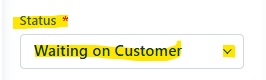
**Note: If customer does not respond back within 2 business Fresh Desk system will auto resolve the ticket.
- If customer responds to ticket after system auto resolves/closes --> the ticket will re-open in your bucket to handle
Scenario 1:
Once customer has provided requested information
I: View details details customer has provided.
Step 2A) If customer meets the $100K or above order criteria:
II. Respond to ticket providing canned response:
- Sales Admin Become a Dealer/Quote (Customer details provided/Need Adam's Approval)

III: Complete Side Cart Fields
IV: Enter Brief but informative Internal Notes
V. Tag Ticket : WOTP
VI: Send a message in SA Team Chat asking for Adam's Approval
- Provide ticket number & advised "Approval for New Customer Set Up"
Upon receiving Adam's confirmation
If Adam approves to escalate to Brian Sheehy
Step 3A)- I. Respond to ticket with a customer follow-up providing canned response:
-Sales Admin Become a Dealer/Quote (Approved Escalate to Brian Sheeby)

II. Complete any additional side cart fields
III. Enter Internal Notes "Adam approve inquiry
IV. Forward ticket to Brian Sheehy requesting to please further assist consumer
-Reminder: Copy and paste all ticket details in your reply to Brian. (This will ensure Brian receives full ticket history)
V. Ticket Status : Select "Closed"
If Adam Does Not Approval to escalate to Brian Sheely
3B)- Adam will advise how to proceed
Scenario 2:
Once customer has provided requested information
Step 2: I: View details details customer has provided.
- Customer does not meet the $100K annual criteria
-Advises they are a 3-P Amazon Seller
-Adam/Brian does not approve
We will direct to our TLC website and provide 15% discount code to apply at check out when placing their online order.
II. Respond to ticket providing canned response:
-Sales Admin Become a Dealer (Not Approved/Offer Discount Code/DTC Website
II. Complete Side Cart Fields
III. Enter Internal Notes
IV. Ticket Status : Select "Closed"