
Carla Sent over the SOP on 1/30/2026
OP360 has taken over order processing for this account 1/30/2026
Good afternoon,
Please note that we have not yet received a purchase order for this account.
At this time, I am only attaching the SOP for reference. Once a PO is received, please proceed with entry and follow the instructions listed in the email.
If PO pricing does not match current price sheet, please email the sales rep for confirmation on discrepancy.
If pricing approval is pending, please place on stop code 7. If pricing matches, please place the order on stop code 8.
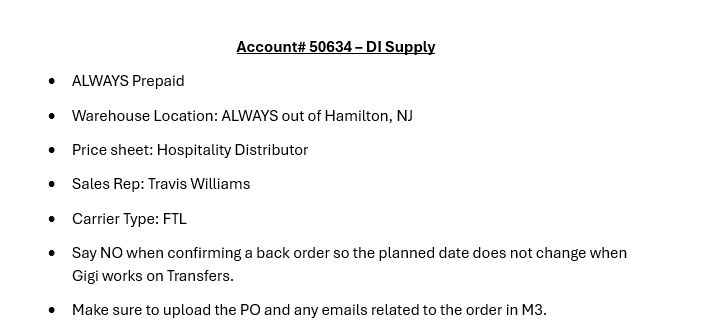
I've attached the SOP for this account for reference.
Please reach out to Gigi or me with any question.
Thank you.
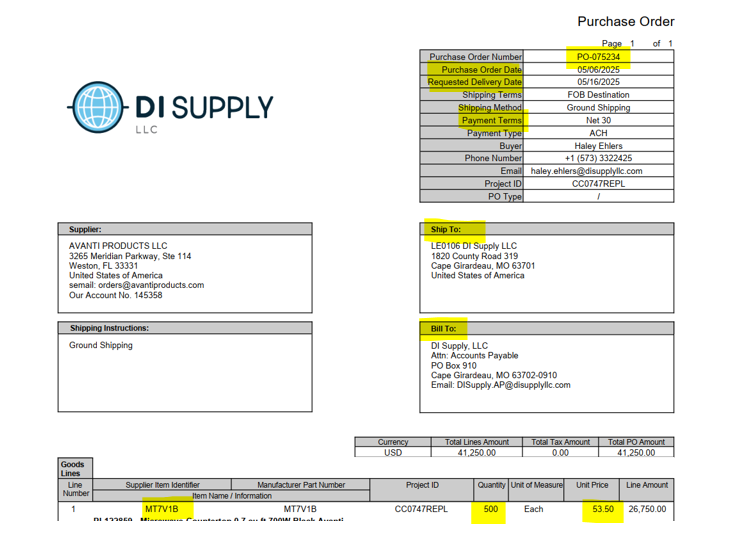
Example of how a PO Field Needs entered:
| Additional Account SOP Details | ||
| Warehouse | HNJ | |
| Carrier | FTL | |
| Ship Via | Logistics | |
| Stop Code | Place in Stop code 7 | Once order is good to be released
|
| Back Order Pop-Up Box | Always Select "NO" | |
| If any special notes are indicated in bode of ticket or on PO | Add to the Special Notes section on the M3 order | |
| Always Remember to attach to M3 Order |
| If A PO/SO is revised: Always remember to attach to M3 Order
|
| Pricing | IF PO price is higher than M3
| If PO is lower than M3
|
| Special Pricing | If initial request advises price is approved
|