Account Information for ticket handling/order processing .
-OP360 SA Agent Team will be processing PO's
1/2/31: Currently DI Container PO/PO's will be handled & orders processed by Gigi and her Team
-Important: Scroll to bottom of article to see process/procedure flow
Update: DI Container PO's: OP360 SA
Revision 12/23/2025: Adam Advised moving forward the Only Selected warehouse is" HNJ
| Question | Answer | Comment |
| PO consists of 1 item -Product is Not Available in HNJ -But Product Is Available in different warehouse | 1. Proceed with processing order -WHS: Select "HNJ" -Product Line: Select "HNJ" -Place Order in Stop Code 7 Note: -Order Status will reflect: Status 22 -Product Line will reflect : Status 22 (Back Order) | Reach out to Lisa in Ring SA Group chat for approval and ask how to proceed -Provide Ticket # -Provide Order # & Details |
| PO consists of multiple items 1. -1 or more Product is available in HNJ -But 1 or more other product is Only available in a different warehouse 2. All Product/Products are Not Available available in HNJ , But all product/products are available in a different warehouse/warehouses | 1. Proceed with processing order -WHS: Select "HNJ" -All Product Lines: Select "HNJ" -Place Order in Stop Code 7 Note: -Order Status for product Not Available in HNJ will reflect : Status 22 -Product Line/Lines for product Not Available in HNJ will reflect : Status 22 (Back Order | Reach out to Lisa in Ring SA Group chat for approval and ask how to proceed -Provide Ticket # -Provide Order # & Details |
| PO consists of 1 or more items on "Reserve" in HNJ or other Warehouses | 1. Proceed with processing order -WHS: Select "HNJ" -All Product Lines: Select "HNJ" -Place Order in Stop Code 7 Note: -Order Status for product all on "Reserve" will reflect : Status 22 -Product Line/Lines for product all on "Reserve" : Status 22 (Back Order) | Reach out to Lisa in Ring SA Group chat for approval and ask how to proceed -Provide Ticket # -Provide Order # & Details |
| PO consists of 1 or more items are Out of Stock in All Warehouses | 1. Proceed with processing order -WHS: Select "HNJ" -All Product Lines: Select "HNJ" -Place Order in Stop Code 7 Note: -Order Status for product OOS will reflect : Status 22 -Product Line/Lines for product OOS will reflect : Status 22 (Back Order) | Reach out to Lisa in Ring SA Group chat for approval and ask how to proceed -Provide Ticket # -Provide Order # & Details |
| Will DMI accept back orders? | David Berry confirmed: YES | Process PO in full , including product unavailable  |
| Account/Order Processing Information | Account Information | Account Information | Additional Comment |
| Dynamic Marketing INC. | M3 Customer ID: 50358 | ||
| Warehouse | WHS Field: Select: HNJ (Only) | Product Line/Lines: Select: HNJ (Only) | (All Orders & Order lines must reflect "HNJ" |
| Carrier | Select: Logistics | ||
| Ship Via | Select: Logistics | ||
| Delivery Terms | PPD (Prepaid) | ||
| Selected Ship Date | Select: The Next Business Day | ||
| Stop Code | -Select Stop Code 7 | Send Ring Central Group SA Chat message to Lisa for approval | -If Approved: modify order to Stop code 8 for shipping |
| Panel K Ship Date | Once you have completed processing PO:
the expected ship date selected would be: 3/31 | There will be exceptions that may be less than 7 business days. I will discuss in our meeting next week. 3/23. |
| Account/Order Processing Information | Account Information | Account Information | Additional Comments |
| Dynamic Marketing INC. Container PO's | M3 Customer ID: 50358 | ||
| Warehouse | DIW | Note: All orders lines will reflect 22 (back Order)
| |
| Carrier | Ocean | ||
| Ship Via | Logistics | ||
| Delivery Terms | PPD | ||
| Selected Ship Date | Next Business Day | Unless in the body of the email or the PO indicates a specific date | |
| Stop Code | Stop code 7 | Send Ring Central Group SA Chat message to Lisa for approval | -If Approved: modify order to Stop code 8 for shipping |
| Update : 3/20/2026 Panel K Ship Date | 100 business days out | Once you have completed processing PO:
Example: PO comes in 3/23 the expected ship date selected would be: 7/1 | Note: If the future date falls on a Saturday or Sunday
|
| Dynamic Marketing INC. Container PO's | Additional Information | Additional Information |
| Because Order lines reflect DIW | The Order Lines will always reflect as 22 (back ordered) |
|
| DMI Container order ticket status | WOTP | 2/9/2026: (Lisa's Use)
|
How to Tell if PO may be a Standard PO OP360 -And Process/Procedure
Step 1:
-View full details of ticket.
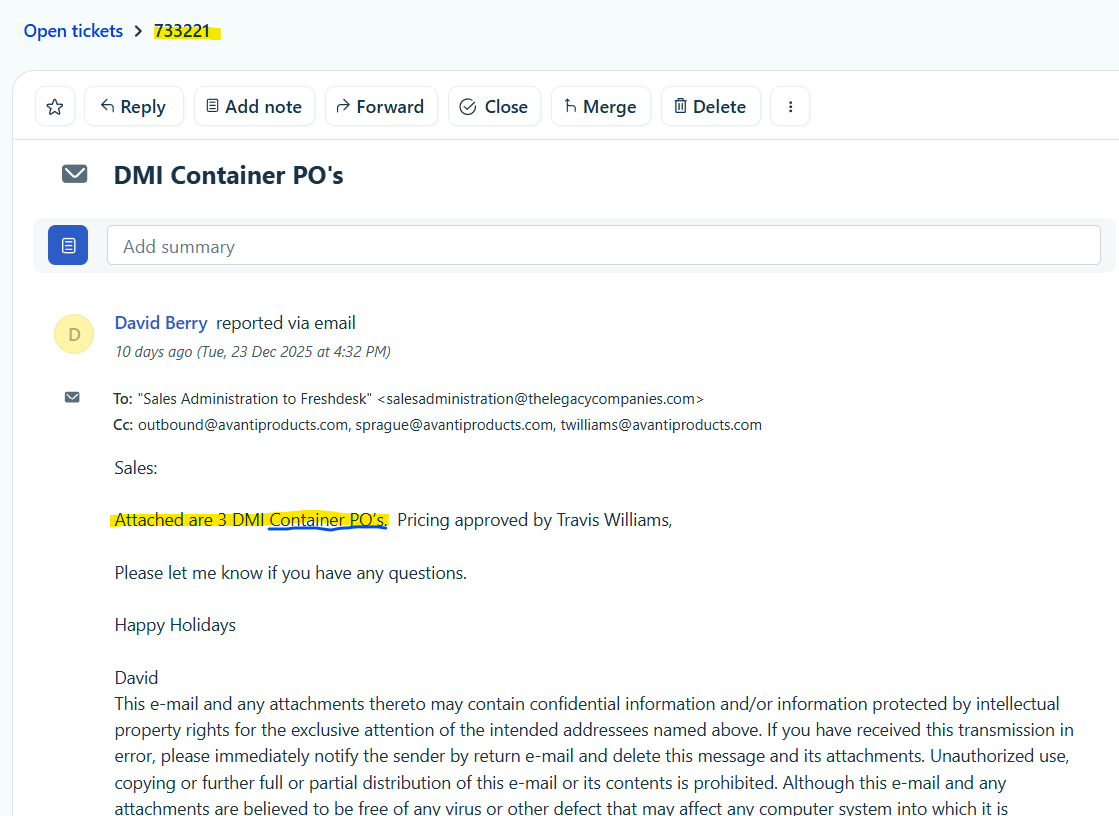
(Example Below: David Berry advised : Attached are 3 DMI PO's)
-If Advising PO from DMI . --> The request is most likely a PO OP360 will process.
How to Tell if PO is a DMI Container PO - And the Process/Procedure
Step 1: -View full details of ticket.
(Example Below: David Berry advised : Attached are 3 DMI Container PO's)
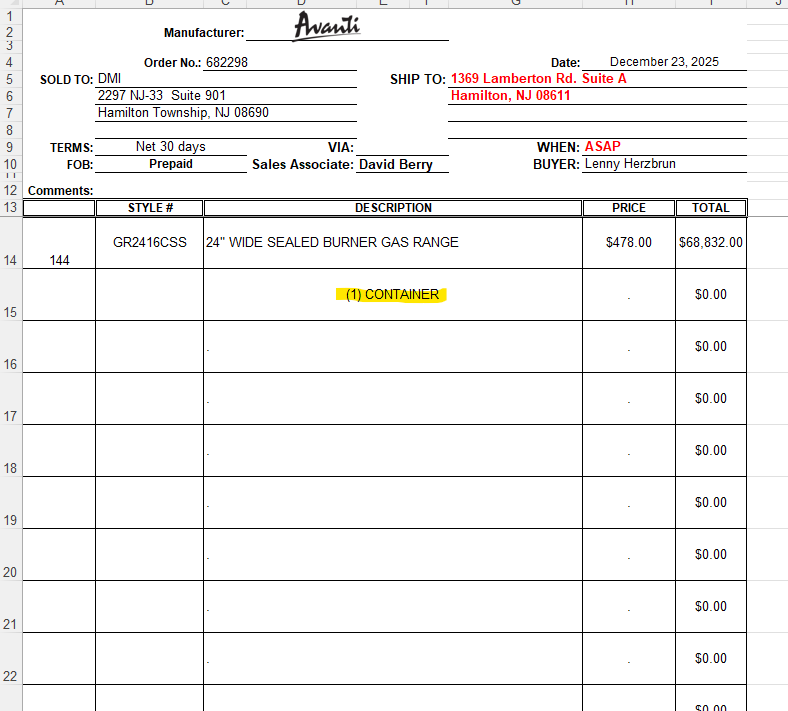
-If Advising PO/PO's are a Container PO -> Container PO represents that PO/PO's are currently processed by Gigi and Team.
Step 2: Send a message in Ring SA Group chat , and Amanda/Nely/Lisa will view ticket details and advise.
If approved to escalate (Forward ticket) to Gigi and Team
1. Copy full ticket history
2.And Paste the full ticket history , including any attachments to Gigi and Team
3. Be sure when forwarding ticket you include everyone involved in the ticket.
Step 3:
-Fill Side Cart Fields out
-Enter Internal Notes
-Ticket Status: Resolved
Example:
-Body of email may state "Container PO
-May also indicate in the subject line of ticket
Attachment/Attachments may state: Container PO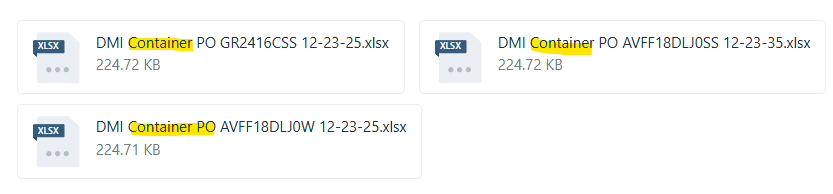
The copy of the PO may state number of containers