
Account Information for ticket handling/order processing .
-OP360 Sales Admin Team overview for ticket handling/order processing
Revision 12/23/2025: Adam Advised moving forward the Only Selected warehouse is" HNJ
Important PO Order Processing
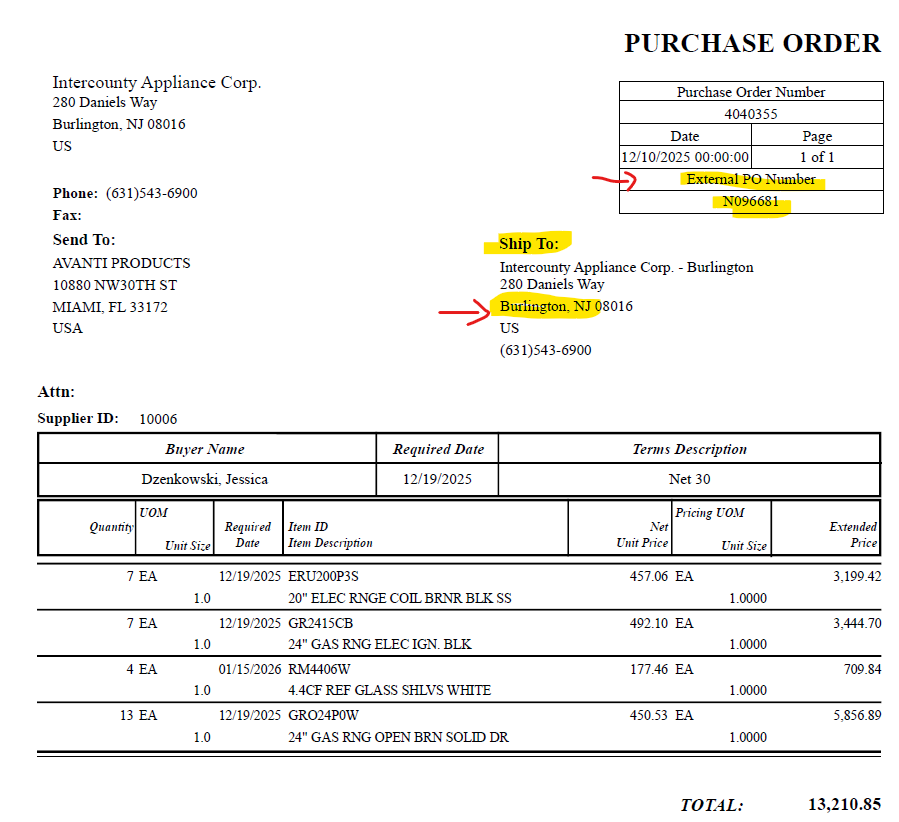
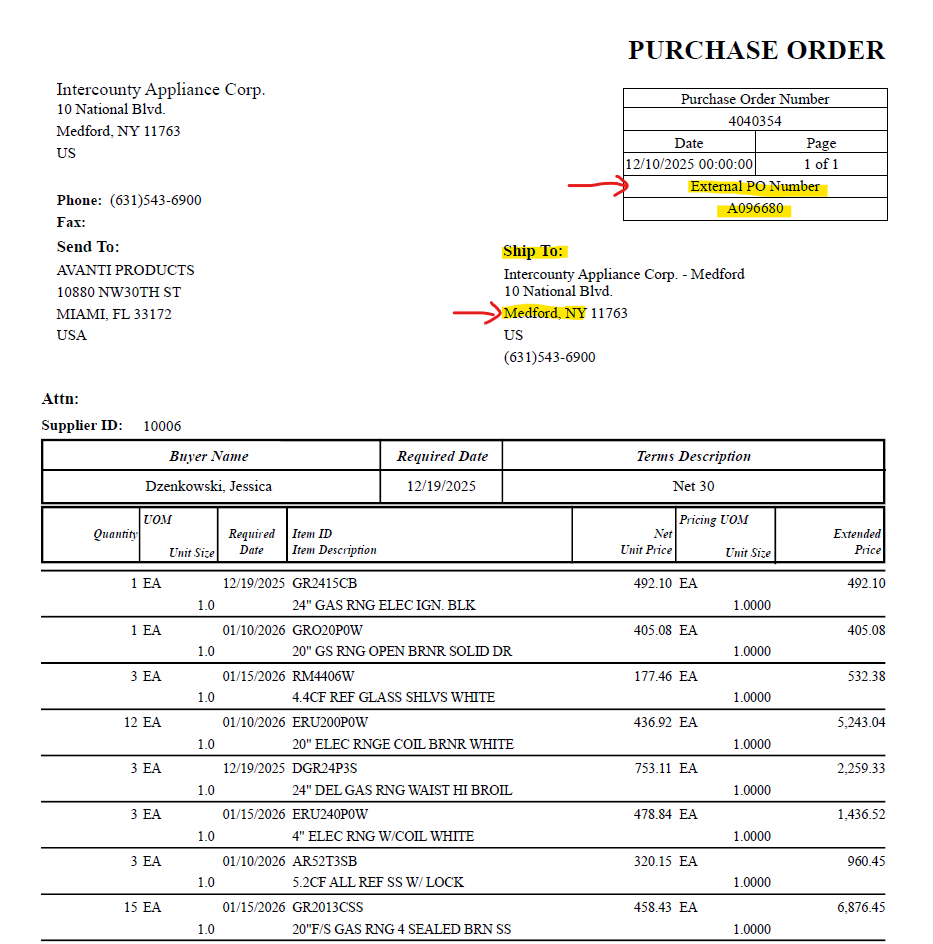
1. You will reference the "External PO Number" for this account.
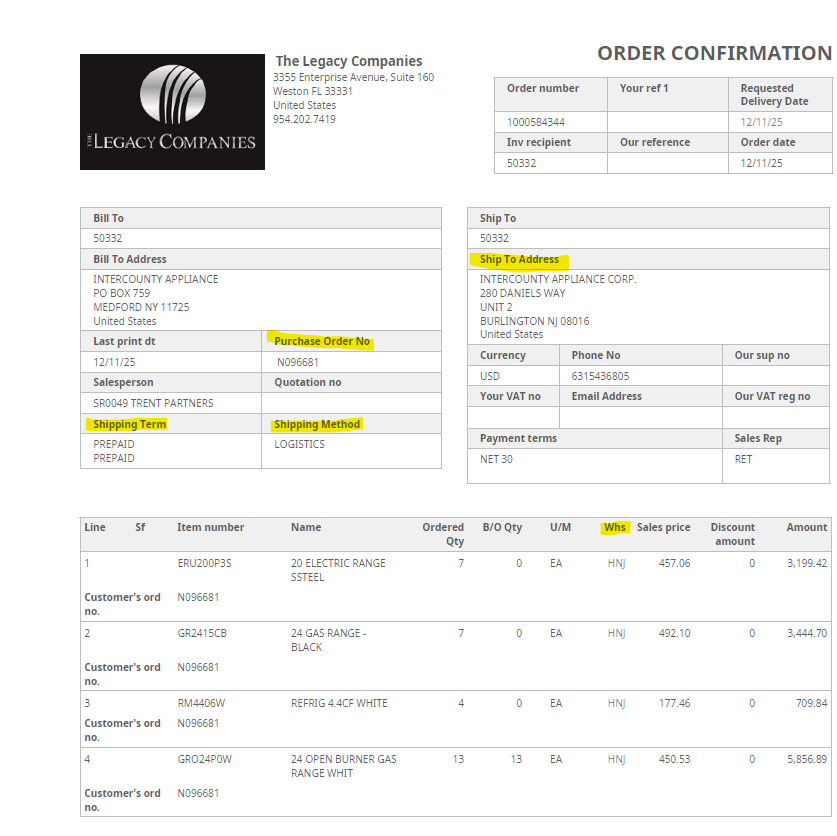
2-A) Orders with Shipping Address to NJ (New Jersey)
- In the PO Field: Enter --> the letter N followed by the External PO Number
Example: You will enter: N096681
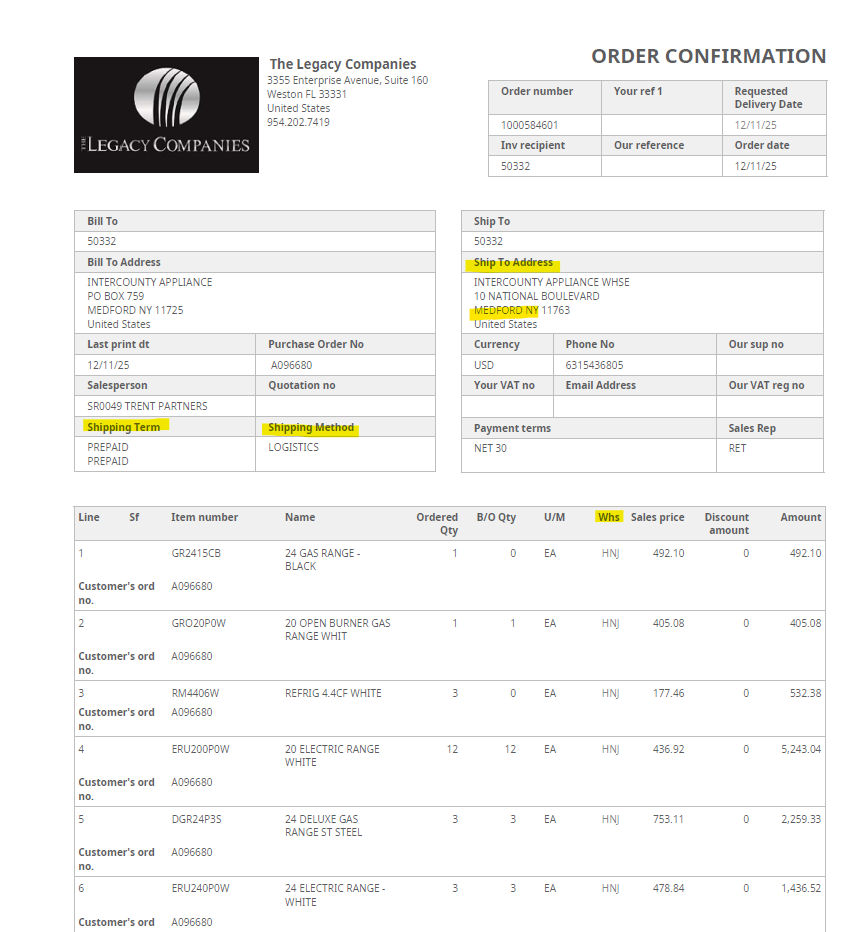
2-B) Orders with Shipping Address to NY (New York)
REVISION 1/18/2026: Include in the PO field: /MEDFORD
- In the PO Field: Enter --> the letter A followed by the External PO Number/MEDFORD
Example: You will enter: A096680/MEDFORD
| Question | Answer | Comment |
| PO consists of 1 item -Product is Not Available in HNJ -But Product Is Available in different warehouse | 1. Proceed with processing order -WHS: Select "HNJ" -Product Line: Select "HNJ" -Place Order in Stop Code 7 Note: -Order Status will reflect: Status 22 -Product Line will reflect : Status 22 (Back Order) | Reach out to Lisa in Ring SA Group chat for approval and ask how to proceed -Provide Ticket # -Provide Order # & Details |
| PO consists of multiple items 1. -1 or more Product is available in HNJ -But 1 or more other product is Only available in a different warehouse 2. All Product/Products are Not Available available in HNJ , But all product/products are available in a different warehouse/warehouses | 1. Proceed with processing order -WHS: Select "HNJ" -All Product Lines: Select "HNJ" -Place Order in Stop Code 7 Note: -Order Status for product Not Available in HNJ will reflect : Status 22 -Product Line/Lines for product Not Available in HNJ will reflect : Status 22 (Back Order) | Reach out to Lisa in Ring SA Group chat for approval and ask how to proceed -Provide Ticket # -Provide Order # & Details |
| PO consists of 1 or more items on "Reserve" in HNJ or other Warehouses | 1. Proceed with processing order -WHS: Select "HNJ" -All Product Lines: Select "HNJ" -Place Order in Stop Code 7 Note: -Order Status for product all on "Reserve" will reflect : Status 22 -Product Line/Lines for product all on "Reserve" : Status 22 (Back Order) | Reach out to Lisa in Ring SA Group chat for approval and ask how to proceed -Provide Ticket # -Provide Order # & Details |
| PO consists of 1 or more items are Out of Stock in All Warehouses | 1. Proceed with processing order -WHS: Select "HNJ" -All Product Lines: Select "HNJ" -Place Order in Stop Code 7 Note: -Order Status for product OOS will reflect : Status 22 -Product Line/Lines for product OOS will reflect : Status 22 (Back Order) | Reach out to Lisa in Ring SA Group chat for approval and ask how to proceed -Provide Ticket # -Provide Order # & Details |
| Account/Order Processing Information | Comment | Comment | Comment |
| Intercounty Appliance Corp. | M3 Customer ID: 50332 | ||
| PO Field | Reference the full External PO Number | Ship To: Medford PA Include /MEDFORD Example: A096680/MEDFORD | UPDATE: 1/23/2026 Ship To: Burlington , NJ Include/BURLINGTON Example: N096681/BURLINGTON |
| Warehouse | WHS Field - Select: HNJ (Only) | Product Line/Lines: -Select HNJ "Only" | (All Orders & Order lines must reflect "HNJ" |
| Carrier | Select: Logistics | ||
| Ship Via | Select: Logistics | ||
| Delivery Terms | Select: PPD (Prepaid) | ||
| Selected Ship Date | Select: The Next Business Day | ||
| Stop Code | -Select Stop Code 7 | If Approved by Lisa : Modify order to stop code "8" |