
Process Flow: How to check M3 Product Availability
| Prior to providing resolution | Always check M3 (MMS081) for product availability | |
| Prior to processing M3 Order | Always Recheck M3 (MMS081) for product availability | |
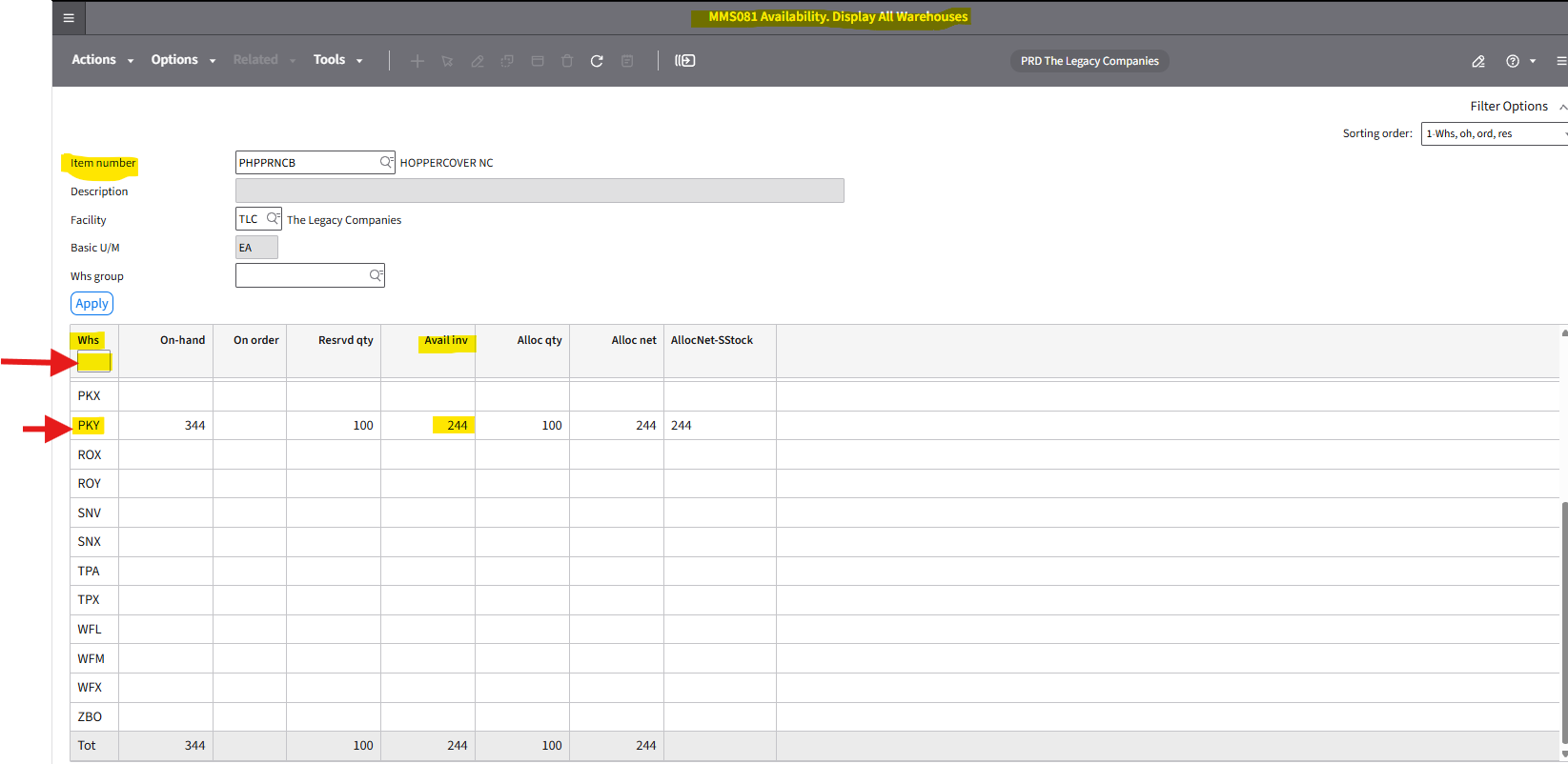
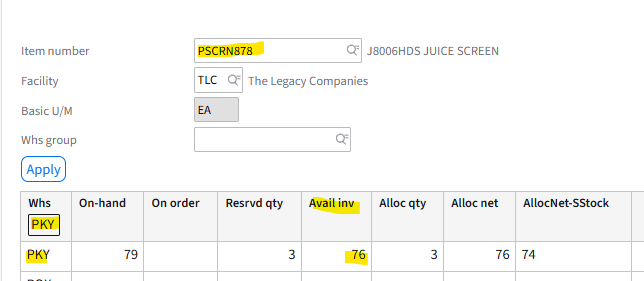
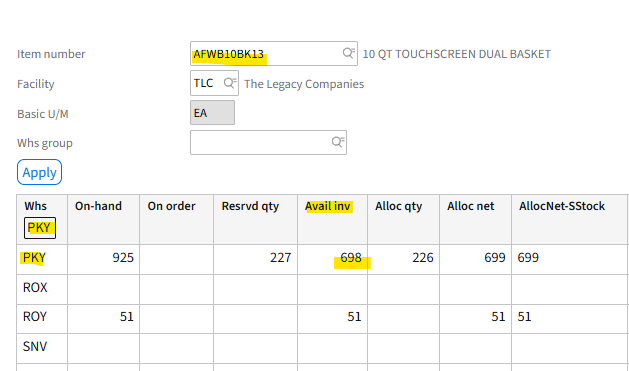
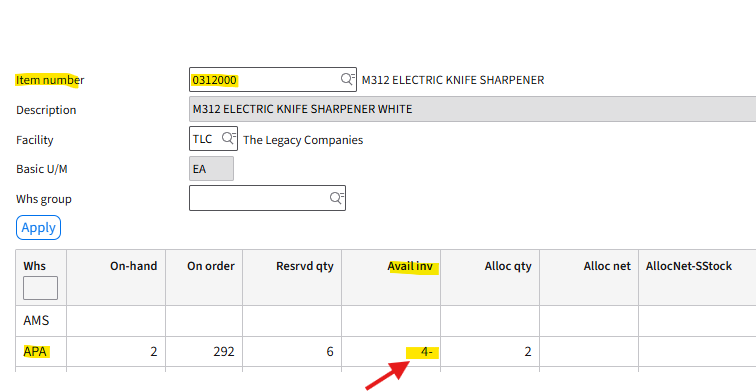
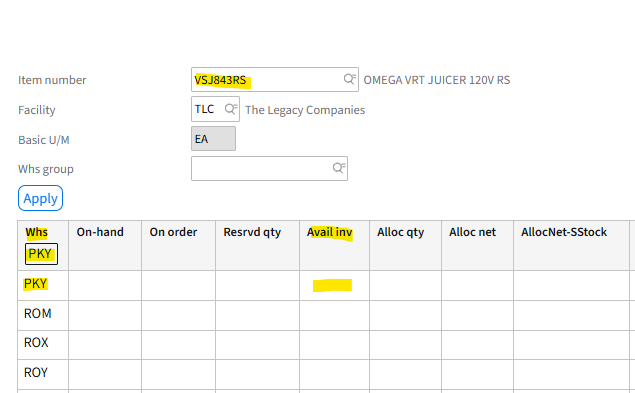
| Countertop Brands Mandatory: Only reference in M3 (MMS081) for product availability  | Is the : "Avail Inv" Column | Quantity Reflects a "Positive" Quantity - Product is available for CR Quantity Reflects Blank -Product is OOS/Unavailable Quantity is a Negative -Product is OOS/Unavailable |
| Please Note: West Bend Major Appliance Category - Reach out to Level 3 for approval | Reach out to Level for approval prior to advising customer product availability | Examples:
|
| Warehouses Locations: | Primarily : PKY - Paris KY But can ship from: APA - Avondale PA HNJ- Hamilton New Jersey SNV -Sparks Nevada WFL - Weston Florida | Do Not Utilize the Returns Warehouses APX HNX SNX WFX |
Understanding M3 (MMS081) inventory columns
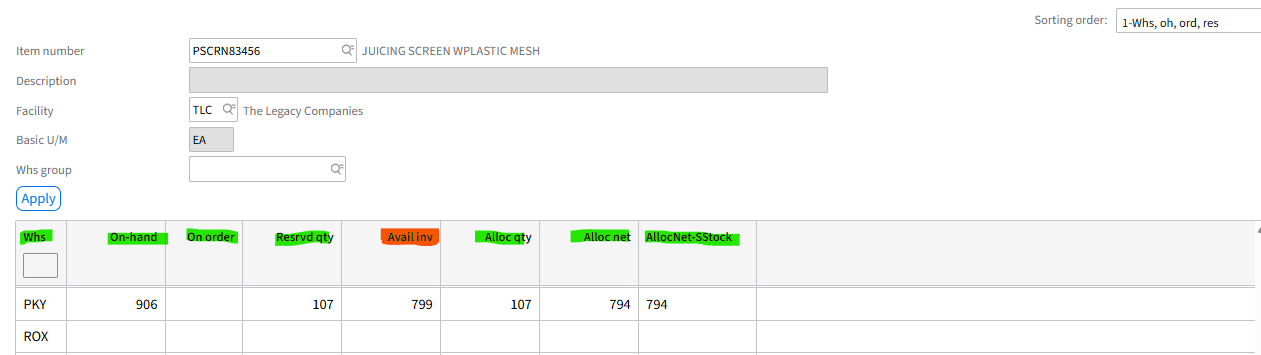
| WHS | ON-HAND | RESRVD | Avail inv | Alloc qty | On Order | Alloc net Alloc Net SSStock |
| TLC Warehouse Location | Total product quantity in warehouse location | Inventory is Reserved for Sales Admin Retail Team Pending Orders" -Inventory is "Not Available" for CR Order Processing | Total inventory qty available for CR order processing. Reminder: CR Only references this column for product availability | Total Inventory qty allocated to orders in queue awaiting shipping | **Please do not reference - information may be incorrect -Reach out to Onshore Support for product ETA | Please do not reference: For Warehouse use only |
| Exception: "Omega" Spare Parts Reach out to Onshore Level 3 (Rob Boyd) for approval |
***Click Link for West Bend Major Appliance Product List: https://westbend.com/pages/major-appliances

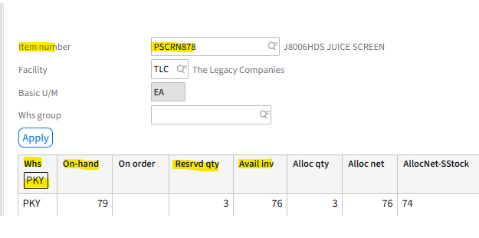
M3 -Column breakdown (M3: MMS081 View)
- Please reference bottom of article for Additional Snip Its of Product Availability
How To Steps:
Step 1. Log into M3
Step 2: Left side tool bar: Click "Favorites" & drop down list will appear
- Select : MMS081 Availability. Display All Warehouses
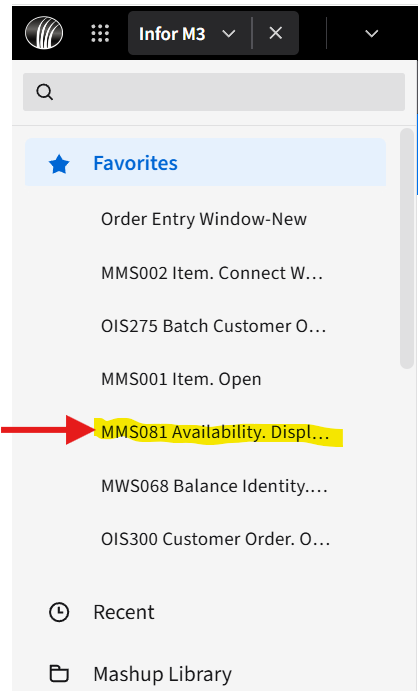
Screen Populates
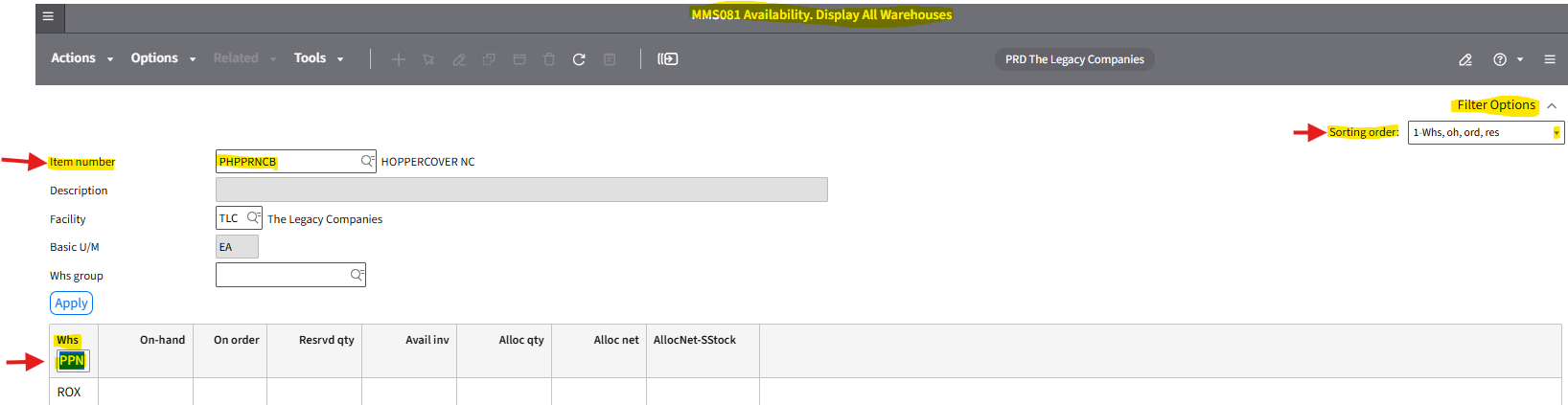
Step 3: Top Right :Filter Options Location
I. Sorting order: Select ->1-Whs,oh,ord,res
- Choosing a different sorting order will not reflect true Countertop product availability
II. Item Number: Enter full M3 Part (SKU) Number: (Example: PSCRN83456)
- Units: Enter Full Model (SKU) Number: (Example: MM900HDS)
III. Whs Field: Field will auto populate "PPN"
- Backspace to remove : PNN -> This will allow you to view all warehouse locations
M3 now reflects All warehouse locations & Product Availability
Do not know the Item (Full Unit Number /Part Number ) -Use Search engine below.
1. Search by Part Name : (Example: Auger)
2. Search by Partial Model Number : ( Example: PCWBSCRD) -> The Full Model Number is: PCWBSCRD13
Please Note:
- Search is broad & does not reflect real time inventory availability.
- This search is to only be used to locate Part Number "OR" Full unit Model Number
- Mandatory: After locating --> Go TO: MMS081 for product availability.
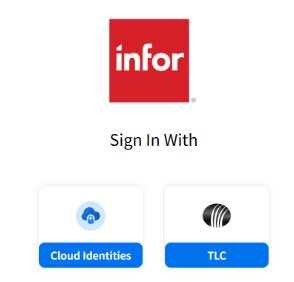
Step 1. Log into M3
Step 2: Left side tool bar: Click "Favorites" & drop down list will appear
-Click/Select: "Mashup Library" -> Drop will reflect
- Select : item_Overview_DIS
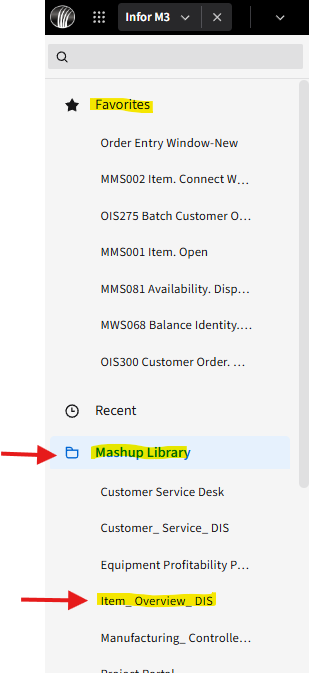
Screen Populates
Step 3: Click "Search for item" field
- "Search box" populates: There are 2 ways to locate the product with this view
A) Part Search: Enter the Part Name (Example: Auger) & hit "Enter" . Scroll until you locate the part
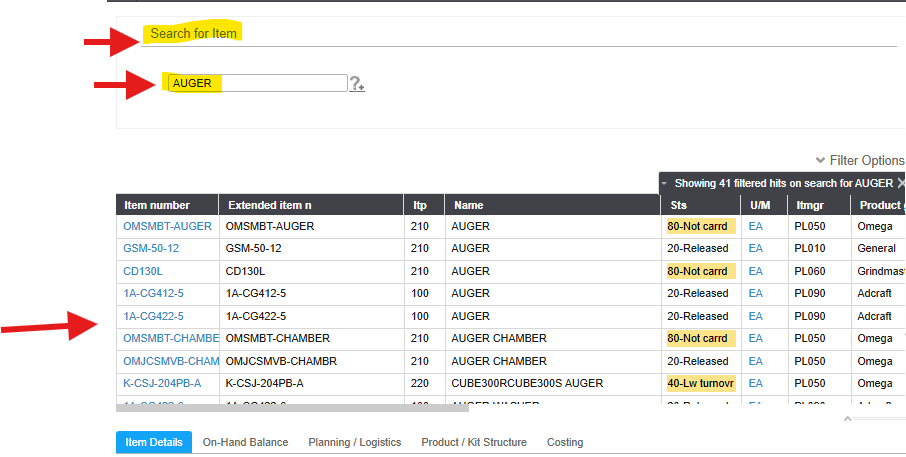
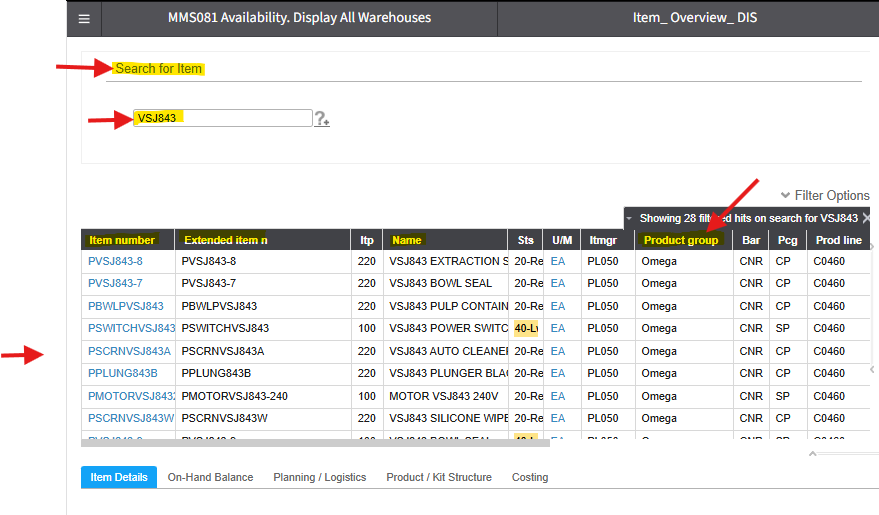
B) Part Search: Enter only a partial Model SKU (Unit) number , related to the Spare Part (Example: VSJ843) & hit "Enter"
- The part list will populate
- Example: VSJ843 is a partial model (SKU) Number -> Full Model Number is: VSJ843QS, VSJ843RS, OR VSJ843QR
- Please note: This search does not always pull "All" parts associated with the Model (Unit)
- Note: If you click the "Product Group" column 2 times it will show all (Example: Omega) together.
3 Examples of product available for CR order processing
Example 1:
Example 2:
2 Examples of Product "All Reserved" or "OOS" -> Not available for CR order processing
Example 1: All stock quantity reflects "Resrvd qty" & "Avail Inv" reflects a "Negative" quantity
Example #2: Product Out of Stock
Key words
M3 Inventory
How to search inventory
Part Inventory
M3 Part Inventory
Inventory
Juicer Inventory
West Bend Inventory
Chef's Choice Inventory
Yonanas Inventory
Excalibur Inventory
Zeroll Inventory
Kalorik Inventory
Vinturi Inventory